Showing posts with label vocabulary. Show all posts

Thursday, November 24, 2011

EllloEnglish !


This week website is another useful tool for improving listening skill. Elllo offers loads of listening materials ranging from audio clips, video clips, songs, news and etc. It is like an online library for listening materials!


The website is organized according to the theme for each listening materials types. There are a few types or sections – View, Mixer, Game, News, Videos, Scenes and etc. Each section provides lists of listening materials. You can click on a topic and it will link you to a Listening Lesson. The listening lesson comprises the multimedia, free mp3 files, transcription, vocabulary tasks, language notes and many more. Learners are not only having the access to the listening materials but also the tasks. They can do the listening activity online. Even more, they can easily download the listening materials together with the listening activity if they were to do the practice some other time on their computer without having to use the internet.

Learners between 13 to 17 years old might benefit from this website and they might find Elllo interesting and easy to carry out because of the well organization and layout as well as the variety of topics offered.

Here I am showing one example of the listening activity. The topic I chose is 'Boys Camp'. It has an audio clip for the listening, the transcription, audio slide show, vocabulary focus and the comprehension questions.


Why I should recommend Elllo to learners?

  1. Elllo offers numerous listening materials which are recorded by the people from the different parts of the world. Hence the English used by the speakers in the audio or video clips are differing in accents. Learners can learn the differences between native speakers and non-native speakers’ uses of English.
  2. The advantage of using authentic materials in learning language is learners can adapt how the language is used in the real world situation.
  3. The variety of topics including culture surrounding which learners can choose to complement their personal interests in additional to their knowledge. This is also a good example of integrating content in language learning.
  4. Encourage autonomous learning as learners can do all the activities outside the classroom without the help from the teacher.
  5. Learners are exposed to different types of text which require them to engage with different language skills (listening, writing, reading, vocabulary). It offers learners the opportunity to learn and practice the skills.
  6. Enriched with vocabulary - vocabulary enhancement in terms of pronunciation and information on how to use the words correctly.
  7. Provide learners with the reason for listening so that they can complete the tasks afterwards.
  8. It is free to download all the contents and it is legal to copy and distribute the materials for educational purposes.

Some limitations to this tool:

  1. The videos cannot be downloaded. You can only download the mp3 files of the listening materials.
  2. The website sometimes corrupts and when it happens, it changes the layout, loses all the images and might result in discouraging learners to continue using the tool.
  3. The advertisements on the page are sometimes distracting. I get confused between the video for the listening material and the ads video.

Nevertheless, I would still recommend this website for learners to improve their English language uses and skills.

-Suze-


Tuesday, November 15, 2011

What are the words again? They're Wordle and Wordsift!


This week I am going to introduce two websites which specialize in 'generating word clouds' from a text that you can provide. The word clouds can be helpful for learners to understand the gist of a text before they actually read the real text. The clouds are created from a group of vocabulary or important words that appear frequently in the reading text.

The first tool of creating the word cloud is Wordle.


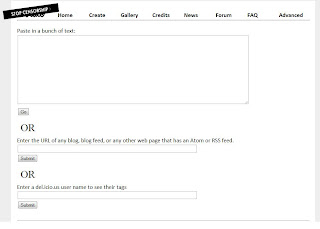
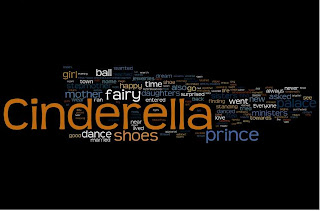
When you enter the website, click on the 'CREATE' button to start creating your own word cloud. You can choose your own text, copy and paste it into the website OR you can enter the URL of any blog, blog feed, or any other web page that has an Atom or RSS feed to use the content. I tried copying a short story and pasted it into Wordle and this is what the word cloud looks like:


You can edit the word cloud according to your preferences such as changing the font, colour and layout. And when you are satisfy with the word cloud you have made, you can print it straight away!

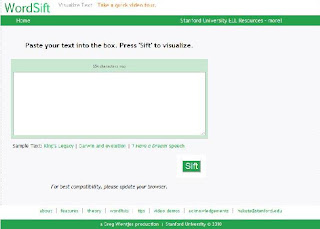
The second tool created for the word cloud is Wordsift. Similar with Wordle, you have to provide your own text and paste it into the box, click the 'sift' button and you will get your word cloud.


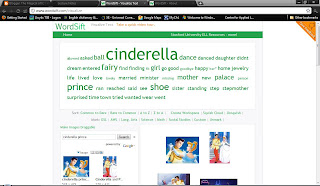
Then you will get this visualization with the most frequent word appears bigger than the others. You can also change how the words are arranged by clicking on the available button. There are also a few pictures related to the words suggested for you to choose from. In my example, there are the pictures of Cinderella dancing with the prince, which in my opinion will help a little bit for the learners to understand or imagine the story. However, if a more academic piece is used, the pictures may not be related to the content at all hence the pictures may not be much helping.

You can find another interesting tools in Wordsift website, at the bottom of the page, where there is a box which is the 'Visual Thesaurus' and a box full with the example of sentences from the text. Visual thesaurus can be used if the learners are not sure of any words so the can look up the thesaurus and a find the other meaning for that word. Meanwhile the example of sentences are the sentences which contain the most frequent word appears in the text. By reading the sentences, learners can extract the main idea of the text.

The advantages of both Wordle and Wordsift:

  • The website is free
  • The idea of visualizing the important words can make reading comprehension more effective by activating learners' schemata
  • Can be prepared as a fun pre-reading activity
  • Can be used as an in-class activity which teacher can ask learners in group to create their own word cloud and personalize it

Fortunately I cannot find any disadvantages to both tools except the webmaster can improve a little bit on their websites layout to make them looks more interesting. But don't worry, the word clouds are awesome! I personally recommend teacher to introduce these websites to the learners so that they can benefit from both tools.


-Suze-


Monday, October 17, 2011

Listen and Write


Listen and Write is another website which is designed to help learners of English improve their listening skills. It is different from other listening practice web which the learners practise to listen to the news. The topic and content of the news might vary according to learners' level of English. When we go to the website, learners can choose their levels and also the news they would like to practise with. They can play the audio and listen all audio at once before they start typing in what they have listened. The next stage, the audio is parted into several tracks so that learners can listen to one track and then write down the transcript before moving on to the next track until the end of the audio.


Here is the link which I get from the website, to demonstrate and explain how to use the website.


In my point of view, this tool is suitable for learners or beginners from the age of thirteen and above because news broadcasting is not an easy piece of listening materials. The news is authentic and the speaker use their own tone, voice and accent which might be difficult to understand. Other than that, the issue discussed in the news might be general and recent issues but younger learners might not aware of such content. Thus it is not giving such motivation to the younger learners.

Other than that, it promotes the use of multiple skills which are listening, writing and spelling at the same time which I think is quite hard for beginners to cope with. The news content also comes from various sources such as radio and bbc which might be easier for a more advance learners to understand. However the choice of topic is always updated and recent. This might motivate the learners to choose that particular topic to listen to the content while learning the language.

Because it is a free website, learners can do the practise at home and this will lead to autonomous learning which is an excellent way of learning English language. Another brilliant and interesting content of the website is learners can keep a record of their performance. This record can be used to evaluate their language performance and improvement from time to time. My advise, teachers should model to the learners of how to use the tools because it is not really user-friendly.

-Suze-


Lyrics Training


Lyrics Training provides an easy and fun method to learn and improve language skills through the music videos and songs. It helps learners to learn language by practicing listening and writing (as well as spelling) skills. Learners can choose their favourite songs from a variety of music videos. While listening to the songs, the lyrics will appear at the bottom of the video with some words missing. To improve the listening skill and language, learners would have to fill in the blanks with the correct words.


This free website is suitable for all level of learners as early as eleven years old because learners can choose the difficulty at the very beginning of the practice to suit their level of English. For example, if beginner level is chosen, the missing words are ten percent of the song lyric while if the expert level is chosen, learners would have to type in all the lyrics.


The song will keep playing until it reach a blank and the song will pause to give time for the learner to fill in the blank. If the word is correct, the song will continue to play. While listening, learners can pause or replay the song for example to listen to the previous line. There is a 'help button' below the screen which can be useful for learners to complete the lyrics training.


When you managed to complete the lyrics, you will be given your score based on the count of right words you put in and the period of time that you consumed to complete the song. To make it more interesting, you can sign in to the website so that your score can be recorded and you can compete with other learners to be the high scorer. You can also post and share your score to facebook and twitter for your friends to see and join the competition.


The advantage of Lyrics Training is it is suitable for all level of English learners to practise and improve listening and spelling skills. This website can become a very useful tool of encouraging learners to learn the language on their own. They can do the practice at home or whenever they have free time. The use of songs in learning language is a very good approach. Learners especially the younger one can be motivated to learn from the new vocabulary to the sentence structure. The variety of songs selection gives the opportunity and freedom to the learners to choose their favourite songs for entertainment as well as enjoying the learning process.

However, this can also become a discouraging factor because learners might prefer to choose their favourite songs which they are familiar with. In that case, they can easily fill in the lyrics which they have memorized. There is a possibility that learners will not choose a song that they do not know because it might be out of their interest. Thus in my opinion, there is no point of practising the song we already know all the lyrics. To overcome this situation, teachers can carefully choose some songs which they think can entertain and draw learners' interest and introduce the songs for the learners to try.


-Suze-


Thursday, October 13, 2011

Dvolver Movie Maker


What is Dvolver?

Dvolver is a very useful website for English teachers to teach English in a different and more interesting way.

What is Dvolver?

Dvolver is a very useful website which can help English teachers to conduct a lesson in a different and interesting way. It enhances the learners knowledge of vocabulary as they try to use as much vocabulary items to construct the dialogues. The website allows teachers and the learners to create a short movie by giving them the opportunity to choose from a number of cartoon characters and create their own dialogues to put them into a movie. English learners from the age of thirteen can be taught to use the website as it requires simple technique of using the ICT.

How to use Dvolver?

When you go into the website, you will first choose the background and atmosphere that you prefer your movie should be. The next stage, you will have to select the plot of the movie and two characters involved in the interaction. Then you will be able to start filling in the dialogue boxes with your own creativity based on the plot you already have in mind. As a final touch up, you can select a background music to give a mood to your movie and that's it, you have become a movie director! To learn more about Dvolver movie maker, you can go to the website and try it. Dvolver makes directing a movie is like A,B,C ! Here is the link to the web. http://www.dvolver.com/moviemaker/make.html

What I personally like about Dvolver?

  • A new approach to teaching and learning
  • Learners get to learn English language and the use of ICT at the same time
  • The activity is fun and interesting to be done whether in the classroom or as a homework
  • It allows creativity which learners can express their idea into the form of movie
  • Step-by-step and easy to use web for beginners which they just have to click and choose from the available selection of how to create the movie
  • Users can embed and share the link of the completed movie into their social network such as blogs, facebook, twitter and etc.
  • It's a free web!!

However in my opinion there are some limitations to the use of the website:

  • Some contents or characters in the web might not suitable for younger learners.
  • The content is dictated by the tools thus it limits the learners' opportunity to choose their own content.
  • Some learners might take the advantage of freedom to use their own words by using such inappropriate language in the dialogue.
  • It might be time-consuming for learners to create dialogues to suit the plot in a very limited lesson period.

Dvolver is one of the various tool for learning language rather than learning the grammar or writing an essay. Learners can forget about the language grammar for a while and enjoy the exploration of the language in a different way. With a close monitoring from the teachers, I personally encourage them to integrate this tool into their language learning course so that learning English can be fun too!


-Suze-